


Introduction
Digital circuits usually process input signals and exhibit output signals in two states – High- Low, 1 or 0, indicating ‘on’ or ‘off’, ‘yes’ or ‘no’. These binary states, high and low, are being produced by the circuit working. But how do we know what logic level results at the output? There should be some glaring phenomena that occur to realise the output.
This phenomenon, rather, is an indicator that should be visible to our eyes or audible to our ears. This indicator is called a logic level indicator, which exactly tells us the end result. The simplest indicator is visual to the eye. The most practical, cost-effective, yet versatile tool is the LED indicator. Let us discuss in this post how to assemble a simple logic-level indicator circuit as a DIY project.
An overview of the logic level
In digital electronics, a logic level is either logical 0 or logical 1, which means either LOW or HIGH. LOW=0, HIGH=1. In digital circuits, logical levels are real voltages measured at the output. LOW represents 0V, whereas HIGH represents 5V. In TTL family circuits, anything below 0.8V is LOW and correspondingly anything above 2.4 V is HIGH. Remember this point when handling such logic-level circuits. Here, the logic-level indicator indicates the output level.
Building your own logic level indicator
Indicating the logic level, whether it is High or Low, can be indicated by a simple single LED combined circuit. There are circuits available with two LED indicators indicating both High and Low simultaneously. One LED lights when the output signal is high, and the second LED lights when the output signal is low. Colour LEDs are used normally, green for High and Red for Low. However, in this post I have used a single LED to keep the circuit simple, reliable and cost-effective.
A simple LED indicator circuit can be built for your own lab test purposes using the IC7404-hex inverter IC, which is an ideal DIY project. You can build a 6-channel indicator using all the sex inverters in a single IC package to monitor multiple output circuits. Only 6 resistors and 6 LEDs are additionally required to construct this simple circuit.
IC7404
IC7404 is a hex inverter IC, around which this simple logic level indicator is designed.
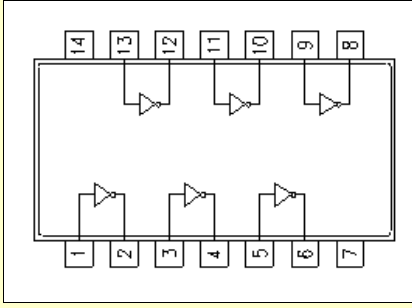
The Circuit – Logic level indicator
As discussed earlier, the circuit schematic is a simple one and straight forward.
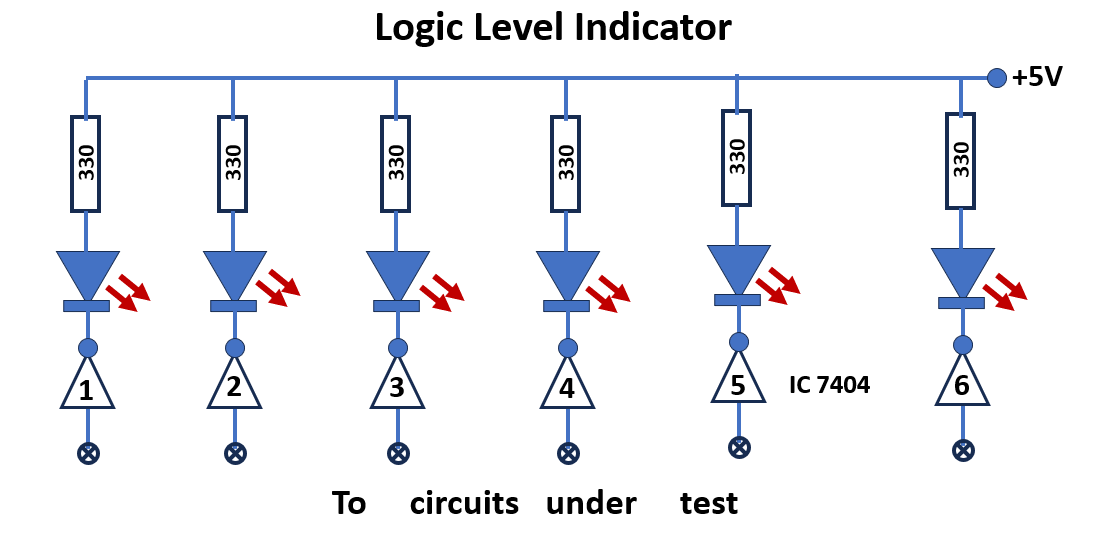
In this circuit all the six inverters of IC7404are used to build the circuit. Pin nos. 1,3,5.9,11,13 are the input pins. Pin nos. 2,4,6,8,10,12 are the output pins for the inverters.
Parts List
IC7404………………….1
LEDs ……………………6
330 ohm resistors……..6
5V power supply.
Now wire the 6 inverters in the single pack of IC7404 as shown in the circuit diagram. It is important to connect pin 14 of the IC to positive power supply and the pin 7 is grounded. It is customary not to show these power supply connections in digital circuits. However they are there. All the inverter outputs are connected to +5V power supply through one LED and one 330 ohms resistor individually. All the input pins of the inverter are kept open as each input can be connected to logic level outputs to detect whether the output is logic High or logic low.
This set up assembly will be used as logic level indicators in the experiments especially for testing logic level output status in digital electronics circuits to follow. Hence it is an useful tool for our future testing in our lab experiments.
Working of the circuit
When one of the inputs of the inverter is connected to an output logic level in a circuit to be tested, immediately the status of the output can be known to us.
A glowing LED will show that the level being monitored is HIGH (binary 1) and an off LED will show that it is LOW (binary 0). There are 6 indicators in the circuit. The final indicator (maybe 6th) can be used to monitor the level of clock pulse exclusively in a test circuit. This can be separately mounted to distinguish from other indicators 1 to 5. These indicators will be used for monitoring other outputs. As such simultaneously 5 logic level output circuits will be tested. This is the added advantage of this logic level indicator. It is therefore advisable to mount the 5 indicators separately in a group.
Indicator 6 is used to test logic pulse
Indicators 1 to 5 are used to test logic level outputs whether it is high or low.
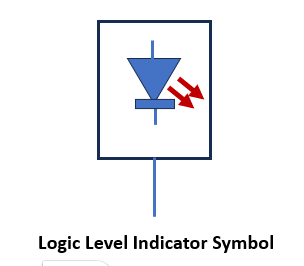
In the circuits to follow in our practical experiments, the full logic level circuit will not be shown and instead only a symbol as shown in fig. below will be used to indicate the full circuit comprising of one inverter, one resistor and one LED.
Assembling
The logic level indicator circuit can be assembled on any general purpose PCB as the circuit is very simple and accommodates very few components. The 5V power supply for the indicator can be tapped from the power supply used for the experimental circuit itself. The assembled board can be conveniently housed in a plastic box for compactness.
Conclusion
This logic level indicator project is described as a DIY project and those desires of using this tester can assemble and keep handy, so that it can be used whenever a logic level output status of aa digital circuit is tested for in a lab. Students, electronics enthusiasts and lab tutors may find this project interesting and consider for worth building for personal use.



[…] circuit diagram and connection details of the Logic level indicators are already described in our earlier practical session. Please refer the same and do accordingly. […]